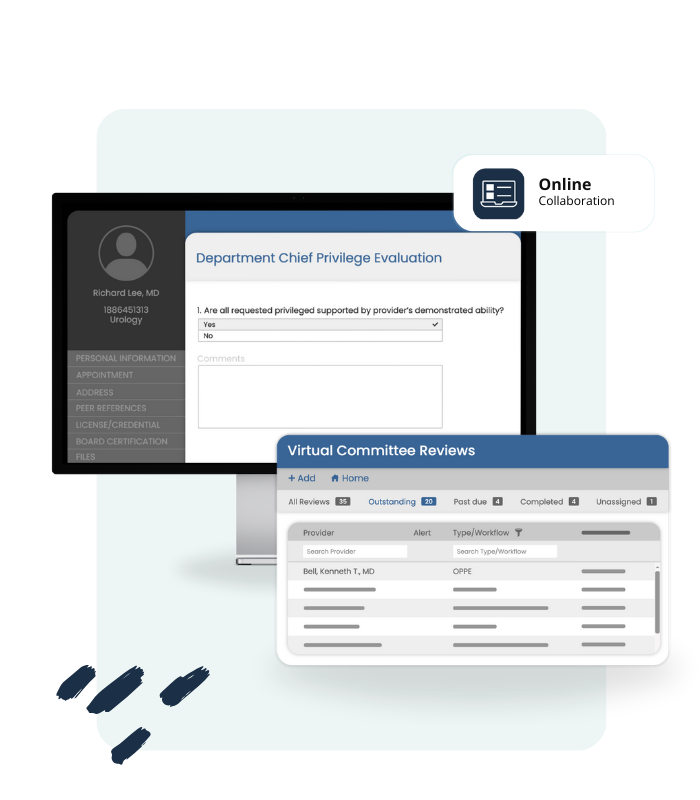


Connect, collaborate, and approve seamlessly.

Virtual Committee is meticulously created with collaboration at its core.

Streamline reviews of credentialing files, peer reviews, and case reviews simply and digitally. Built with intelligent automation, Virtual Committee reduces manual steps by routing tasks, triggering reminders, and updating statuses in real time. Virtual Committee's adaptability allows it to seamlessly integrate with your existing workflows!

Virtual Committee

A smiling medical professional in a white coat with a stethoscope, standing with arms crossed in front of an orange background

Empower your teams to collaborate effectively, enhancing productivity.

A group of healthcare professionals attending a virtual committee meeting via video conference. They are sitting around a table with laptops, tablets, and notebooks, engaging with a doctor on the screen.
Computer icon
Automated

Workflows

Easily schedule and manage committee meetings with Virtual Committee to ensure reviewers meet their deadlines. Integrate with your Teams or Zoom account for seamless tracking.

Medical Staff Professionals can effortlessly send scheduling emails from MD-Staff to keep providers informed about key dates. Send reminders for upcoming tasks, notify about completed actions, and alert about past due dates, ensuring reviews are completed on time.


Virtual Committee revolutionizes the review process by eliminating the need for paper documentation entirely.

By digitizing all primary source verifications, hospital affiliations, and privilege requests, it ensures that every piece of information is accessible online. This not only speeds up the review process but also enhances accuracy and reduces the risk of lost or misplaced documents.

With everything available at their fingertips, reviewers can make informed decisions quickly and efficiently, all within a secure and environmentally friendly digital environment.

Virtual Committee empowers the medical staff office to efficiently track committee reviews by categorizing them into clear statuses: Outstanding, Past Due, Paused, Completed, and Unassigned. This intuitive system allows staff to quickly identify and prioritize tasks, ensuring timely follow-ups and actions.

With real-time updates and easy access to the status of each review, the medical staff office can maintain organization, stay on top of deadlines, and ensure that no request falls through the cracks.

Scribbled circle with light blue background with 1 in the middle.

Interactive Workflows & Worksheets

Workflows within the Virtual Committee platform allow you to define and customize your committee review process precisely.

Each workflow comprises a specific review type and a series of sequential steps. These steps outline the requirements and actions needed at each stage of the review.

Reviewers are assigned tasks based on their roles and expertise, ensuring that each request is evaluated thoroughly. Possible outcomes of the review process include approval, denial, or a request for additional information. Completion options ensure that all necessary actions are finalized, providing a clear and organized path from submission to resolution.

A man in a denim shirt smiling and pointing, with a light blue background.
Scribbled circle with light blue background with 2 in the middle.

Intuitive Dashboard

Virtual Committee’s intuitive design works seamlessly with pre-determined outcomes to simplify the review process.

By setting clear criteria and guidelines, the dashboard becomes a dynamic tool for monitoring and decision-making, allowing you to easily interpret data and prioritize actions. This streamlined process enhances efficiency and transparency, empowering the committee to make informed decisions with confidence.

A man in a denim shirt smiling and pointing, with a green background.
Scribbled circle with light blue background with 3 in the middle.

Flexible Configuration

Virtual Committee offers various review templates for efficient evaluations, allowing for flexible configuration.

  • Case Review template ensures thorough examination of medical cases for quality enhancement.
  • Facility Event templates concentrate on facility-related incidents reviewed in MD-Stat.
  • Meanwhile, the provider template encompasses diverse provider assessments, including initial appointment and additional privileges.

These templates, coupled with flexible configuration options, streamline the review process, ensuring clarity and adaptability in assessing various aspects of the committee’s responsibilities.

A man in a denim shirt smiling and pointing, with a yellow background.
Scribbled circle with light blue background with 4 in the middle.

Bulk Assign & Approve

Bulk review approval offers hospital leadership a remarkably efficient solution, resulting in substantial time savings.

Rather than mandating individual assessment for each review, files are consolidated into a “Bulk Review” queue. This streamlined system empowers decision-makers to swiftly approve numerous reviews together, while flagged files are isolated for thorough investigation during dedicated deep-dive reviews.

A man in a denim shirt smiling and pointing, with a orange background.
A man in a denim shirt smiling and pointing, with a light blue background.
A man in a denim shirt smiling and pointing, with a green background.
A man in a denim shirt smiling and pointing, with a yellow background.
A man in a denim shirt smiling and pointing, with a orange background.

How To Use

Reviewers

Virtual Committee provides reviewers access to a comprehensive, paperless system designed to streamline the review process.

Key Features:
  • Primary Source Verifications: Access all primary source verifications directly through the platform, ensuring accuracy and reliability.
  • Hospital Affiliations: Review detailed information on practitioners’ hospital affiliations.
  • Privileges Management: Easily view all requested privileges submitted by practitioners.
  • Flagged Items of Concern: Verify that the process for requesting further review is clearly defined and straightforward.
  • Decision Making: Approve, deny, or request further review of practitioner requests with a few clicks.

By using the Virtual Committee platform, reviewers can efficiently manage their tasks with confidence and ease.

Virtual Committee
Illustration of Aiva, the robot mascot, with an orange body, two eyes, and a robotic arm in a playful pose.

Embark on a journey towards a healthier Tomorrow

Deliver optimal care with improved efficiency, reliability and collaboration.